
How to Install SkyDraft on Your Phone — Like a Native App
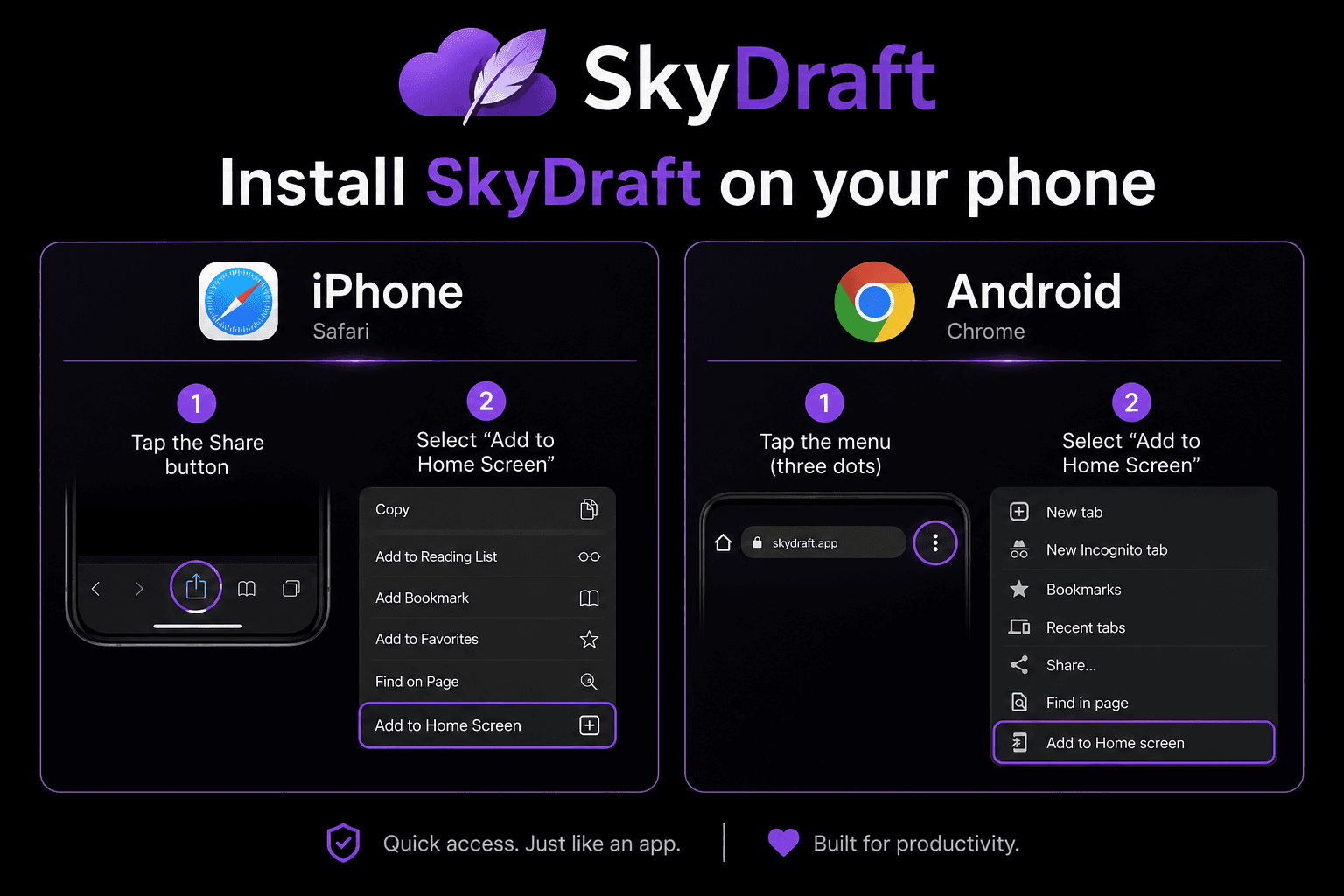
Did you know you can install SkyDraft directly on your phone's home screen — just like a native app? No App Store. No download. Just tap once and you're in, with the full experience running in full screen.
SkyDraft is built as a Progressive Web App (PWA), which means your browser can install it directly on your device. It behaves exactly like a native app — its own icon, full-screen mode, and fast loading — without any of the friction of going through the App Store or Google Play.
This is especially useful for storm chasers and meteorologists who need to generate weather content fast, right from the field, without hunting through a browser.
Install on iPhone (Safari)
Important: you must use Safari on iPhone — Chrome and other browsers on iOS do not support home screen installation.
- Open Safari and go to www.skydraft.app
- Tap the Share button — the square icon with an arrow pointing up, at the bottom of the screen
- Scroll down in the share sheet and tap "Add to Home Screen"
- Tap Add in the top right corner
That's it. The SkyDraft icon will appear on your home screen. Tap it anytime to open the app in full screen, without the Safari address bar.
Install on Android (Chrome)
On Android, use Chrome for the best experience.
- Open Chrome and go to www.skydraft.app
- Tap the three-dot menu in the top right corner
- Tap "Add to Home Screen"
- Tap Add to confirm
The SkyDraft icon will appear on your home screen, just like any other app. You can also move it to your dock or a folder like any native app.
What's different about using it as an installed app?
- Full screen mode — the browser navigation bar disappears, giving you more screen space.
- Faster access — one tap from the home screen instead of opening a browser and typing a URL.
- App-like feel — SkyDraft behaves and looks exactly like a native app once installed.
- Always up to date — unlike App Store apps, updates are instant. Every time you open SkyDraft, you automatically get the latest version with no manual update required.
Your full workflow, right from the field
With SkyDraft installed on your phone, your whole content workflow is one tap away:
- You're in the field — a storm is developing
- Open SkyDraft from your home screen
- Import live NOAA/NWS data for your location, or upload a quick storm photo
- Tap Generate — full post, short version, headline, and hashtags ready in seconds
- Copy and paste directly into Twitter, Instagram, or Facebook
The whole process takes under 60 seconds, even when conditions are moving fast.
Try it now
Create your free account — 10 generations per month, no credit card required. Then follow the steps above to install it on your home screen and have it ready the next time the weather gets interesting.
— The SkyDraft Team
Ready to try SkyDraft?
5 free generations per month. No credit card required.
Create your free account →