

Multi‑model forecast analysis with AI,
ready to publish in seconds.
SkyDraft combines an interactive forecast map, Forecast Analysis charts that stack major models on one timeline, and publish-ready AI copy — headlines, posts and hashtags for any platform — for meteorologists, broadcasters, storm chasers, aurora hunters, journalists, and anyone who covers the sky.
Free plan available · No credit card required
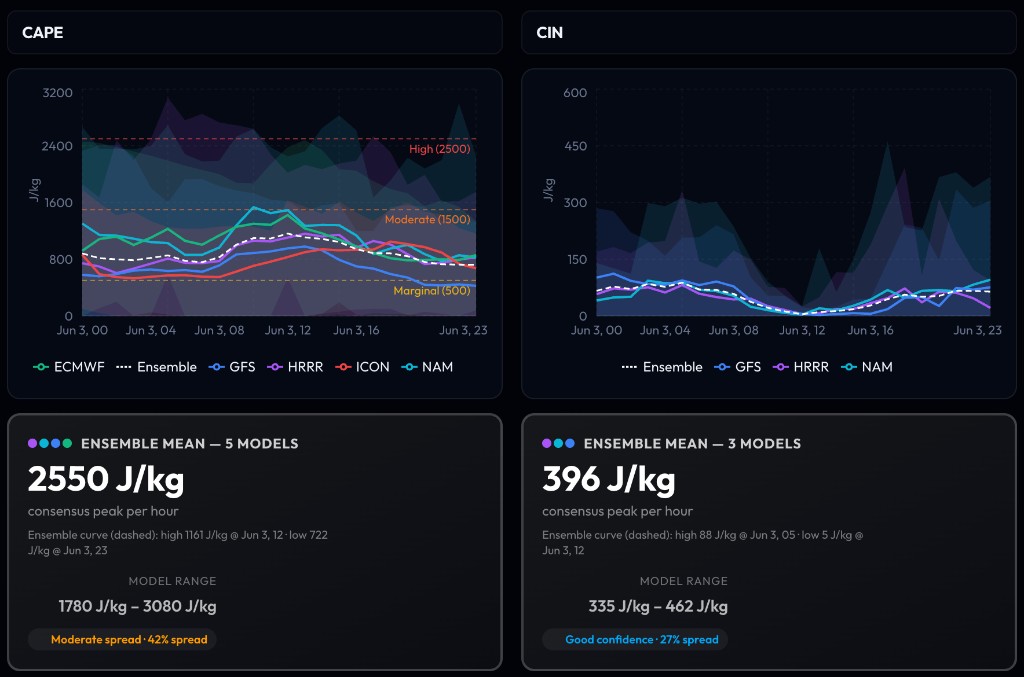
Forecast Analysis stacks ECMWF, GFS, HRRR, ICON, NAM and more on one timeline. Each variable shows an ensemble mean, model spread, and confidence rating — so you know exactly how much to trust the data before you publish.
⚡ Violent storms expected this afternoon
🌩️ Alert for the Greater Montreal area! Violent thunderstorms are possible between 3 PM and 8 PM. Expect heavy rain and gusts up to 90 km/h. Stay safe and avoid non-essential travel.
One input. Every platform.
How it works
Three steps. No prompt engineering required.
Import or enter weather data
Search a city to import live alerts from NOAA or Environment Canada — or upload a weather photo/map for instant AI analysis. Or just type it manually.
Pick your platform & tone
Choose between Twitter, Broadcast, Newsletter and more. Set the tone: urgent, professional, casual.
Get publish-ready content
Receive a full post, a short version, a headline and relevant hashtags — instantly.
Built for everyone who covers the sky
You're no longer stuck pasting captions from a dozen browser tabs alone. Explore guidance on an interactive Weather Map and in Forecast Analysis, then turn consensus into headlines, broadcasts, and threads — SkyDraft spans analysis through publication.
Interactive Weather Map
Visualize multi-model forecasts across a U.S. state or Canadian province — see spatial patterns for storms, wind, snowfall, instability and more before you phrase the story.
Forecast Analysis charts
Compare guidance from major models on one hourly chart with regional grid sampling, ensemble mean and spread bands — so divergence and regional variability are visible, not hidden.
Live weather data import
Search any city to instantly pull real-time alerts and conditions from NOAA/NWS (USA) or Environment Canada — pre-filling the form automatically.
AI photo & map analysis
Upload a weather photo, radar image or aurora dashboard. AI reads the image and extracts event type, location and key details — no typing required.
10 languages supported
Generate content in English, French, Spanish, German, Portuguese and more.
AI that never invents facts
SkyDraft only uses the data you provide. It will never fabricate temperatures or wind speeds.
Templates for brand consistency
Save your tone, platform, language and hashtags as reusable presets for one-click generation.
Favorites & history
Every generation is saved. Bookmark your best outputs and re-use them anytime.
Snippets & reusable blocks
Save signatures, disclaimers or any recurring text as snippets. Inject them via markers or auto-append them to every post — verbatim, never touched by the AI.
Under 10 seconds
From input to publish-ready content in seconds — perfect for breaking weather situations.
Multi-platform in one click
Select multiple platforms at once — Twitter, Instagram, Facebook, LinkedIn and more. Each gets its own optimized version, generated in parallel.
Simple, transparent pricing
Start free. Upgrade when you need more.
Free
$0/mo
To try SkyDraft
- 10 generations / month
- 1 template
- All platforms & languages
- –No snippets
- –No history
- –No favorites
Starter
$9/mo
For regular users
- 150 generations / month
- 3 templates
- 4 snippets
- All platforms & languages
- 7-day history
- Custom writing preferences
- –No favorites
Pro
$15/mo
For power users
- Unlimited generations
- Unlimited templates
- 20 snippets
- Weather Map workspace
- Forecast Analysis charts (beta)
- All platforms & languages
- Full history access
- Favorites
- Custom writing preferences
Frequently asked questions
Everything you need to know about SkyDraft.
What is SkyDraft?
SkyDraft is an AI-assisted weather workflow: visualize multi-model forecasts on an interactive Weather Map, compare guidance in Forecast Analysis charts, then generate posts, headlines, short copy and hashtags for social, broadcast scripts, newsletters, press blurbs — in seconds — with live NOAA or Environment Canada data and photo uploads when you need them.
Who is SkyDraft for?
SkyDraft is built for anyone who communicates weather professionally: TV and radio meteorologists, storm chasers, aurora chasers, weather bloggers, media outlets, and emergency management communicators.
What platforms does SkyDraft support?
SkyDraft generates content optimized for Instagram, Twitter/X, Facebook, LinkedIn, TikTok, YouTube descriptions, press releases, and broadcast scripts — in multiple languages.
How is SkyDraft different from using ChatGPT?
SkyDraft is purpose-built for weather content. It understands meteorological terminology, adapts tone and format per platform, generates relevant hashtags, and lets you save templates with your preferred writing style — something generic AI tools can't do out of the box.
Can SkyDraft import live weather alerts automatically?
Yes! Simply type a city name in the “Import live weather data” field on the generate page. SkyDraft pulls real-time alerts and conditions from NOAA/NWS for the USA and Environment Canada for Canada — including active warnings, bulletin text and expiry times — and pre-fills the form for you.
Can I upload a weather photo or radar map?
Absolutely. The “Analyze a weather photo” feature lets you upload any weather image — a storm photo, radar screenshot, forecast map, or aurora activity dashboard. AI analyzes the image and automatically extracts the event type, location and key details to pre-fill the generation form.
Is my data private?
Yes. Your generated content, templates, and account data are private and never shared. See our Privacy Policy for details.
Can I try SkyDraft for free?
Yes! The Free plan gives you 10 generations per month with no credit card required. Upgrade to Starter or Pro anytime to unlock more generations, templates, and history.
Can I cancel my subscription at any time?
Absolutely. You can cancel your Starter or Pro subscription anytime from the Billing section of your account. You'll keep access until the end of your billing period.
Ready to write faster?
Join meteorologists, storm chasers, aurora hunters, broadcasters and weather journalists who use SkyDraft — from Forecast Analysis clarity to captions on every platform.
Create your free accountNo credit card required · Cancel anytime